"One-stop" User Profiles to Add Programs
Avec réponse
Hello,
When my systems admin add users to programs they find the navigation between pages cumbersome. Admin often miss programs due to the clicking around, which causes frustration with our users and a lot of back and forth between users and admin.
There are around 12 clicks to add a user to each program and most of our users have access to several programs. We have the most turnover in our 6 housing programs, so that's about 72 clicks to give a new staff member access. I've been covering for my admin staff over the last few months and I can see how they would make mistakes easily.
Can the Modernization Project implement a "one-stop" profile so that admin can grant users access to the programs from one page, the User Profile page?
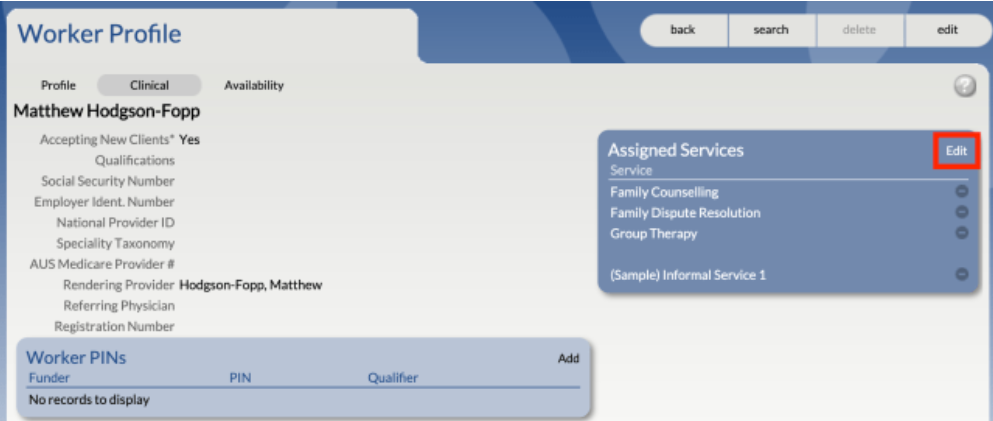
For example, in our old database, it would take about 12 clicks total for the full process. Admin would go to the Worker Profile and edit Assigned Services:
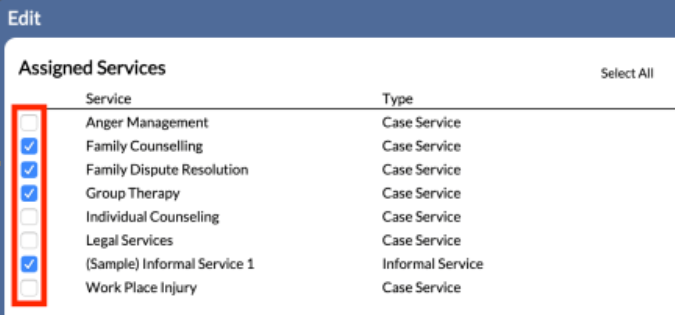
A checklist with all the programs would appear and then we'd save the changes:
Please let me know if you have any questions!
(I originally sent this in as a general ticket, but Raquel said I could send it here.)
-
Commentaire officiel

Hi Jade,
Thank you very much for sharing this detailed feedback, and my apologies for the delayed response. Your comment was mistakenly flagged as spam in Zendesk after a recent update, so it didn’t appear in our moderation queue until now.Your suggestion for a "one-stop" profile page to manage program access is a thoughtful and helpful idea, especially given the volume of programs your team and many others handle. I’ve added this to our Modernization enhancement requests for further review with the team.
Please feel free to continue sharing any additional insights as you have them.
Vous devez vous connecter pour laisser un commentaire.
Commentaires
1 commentaire