Administration - Client Manager
Answered
Hello,
The Client Manager seems to be missing the button to actually merge or delete the client. If it's actually there, the UI might need a tweak to make it a little more obvious.
-
Official comment

Hi Heather,
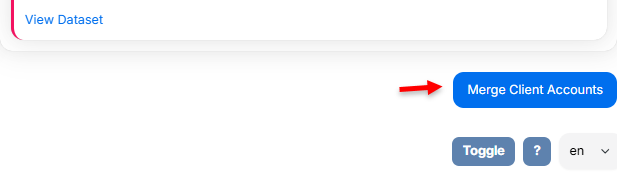
Thanks for reaching out. In the modernized Client Manager, the Merge and Delete actions appear at the bottom of the screen after you select one or more clients. I’ve attached screenshots here for clarity.-
Merge is the blue button on the bottom right, under the Client Account to Discard
-
Delete is the dark pink button below the warning message

I’ve also added your UI feedback to our Client Manager enhancement requests for our development team to review.
Thank you for your continued support and for helping us improve the experience!
-
-
Thanks! I'm embarrassed I missed needing to scroll down. :) With the screenshots, it's pretty obvious, so I retract my feedback.
0 -
Hi Heather,
Not a problem at all! The move from the classic view to the modern layout puts those actions lower on the screen, so it’s easy to miss on first glance. Thanks for the update!0
Please sign in to leave a comment.
Comments
3 comments